
Post-Quantum Cryptography
(PQC)-Enabled File
Encryption & Decryption Solution
Cryptan is a next-generation file encryption and decryption solution
powered by Post-Quantum Cryptography (PQC),
helping organizations protect sensitive data against future
“Harvest Now, Decrypt Later (HNDL)” attacks.
The patented technology protects confidentiality
from the threats of the quantum computer age.
Protect confidential files from quantum-era threats with patented technology.
Try Cryptan Web Try Cryptan Desktop
*A registered 4Login account is required.
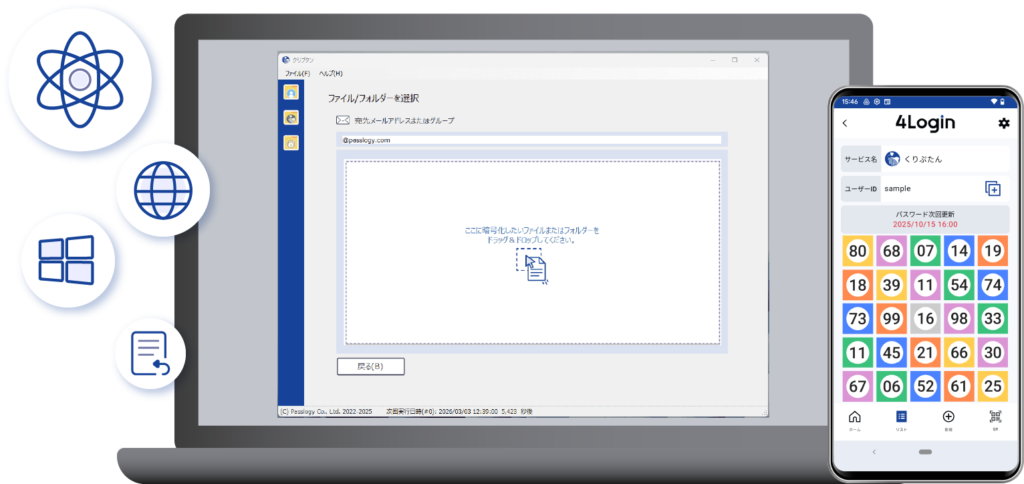
What is Cryptan?
Cryptan is a password-free file encryption and decryption solution from Passlogy Co., Ltd., built on patented technology.

No Password Required
No need to create or share ZIP passwords. Simplify secure file sharing while minimizing the risk of password exposure.
Only the Designated Recipient Can Decrypt
Only the designated recipient can decrypt the file. Even if the encrypted file is obtained by someone else, it cannot be opened.
Personal Backup
Protect your important files by encrypting them for secure personal backup, in addition to secure file sharing.
Post-Quantum Cryptography (PQC)
Protect your important files against future cryptographic threats with Post-Quantum Cryptography (PQC).
4Login Dev Supporters
How It Works
Cryptan uses the 4Login mobile authentication app to ensure that only the designated recipient can decrypt encrypted files.
Step 1: Install the App
Install the 4Login app on your smartphone.
Step 2: Encrypt Your Files
Select the file you want to encrypt using Cryptan Web or Cryptan Desktop, then encrypt it.
*Cryptan Web uses 4Login for user authentication.
*Cryptan Desktop links with 4Login during the initial setup.
Step 3: Store or Share Securely
Store encrypted files as your own secure backup, or securely share them with designated recipients.
Step 4: Decrypt Your Files
Select the encrypted file using Cryptan Web or Cryptan Desktop, then decrypt it.
*4Login authentication is required for decryption.
How to Encrypt Files
Simply enter the recipient’s email address, then drag and drop your file to create an encrypted file.
Once the encrypted file is created, send it using any method you prefer—email, chat, or cloud storage. No password setup is required.
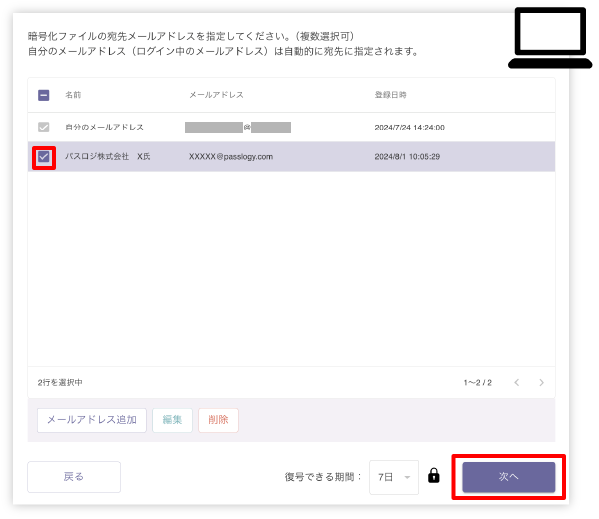
STEP1
Enter the recipient’s email address.
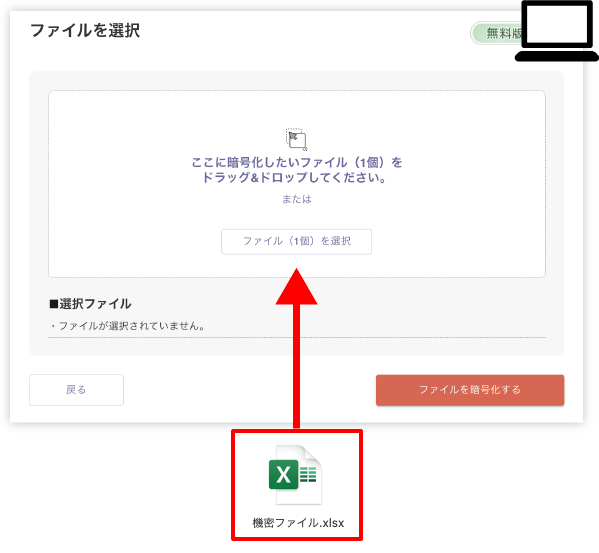
STEP2
Drag and drop the file you want to encrypt.
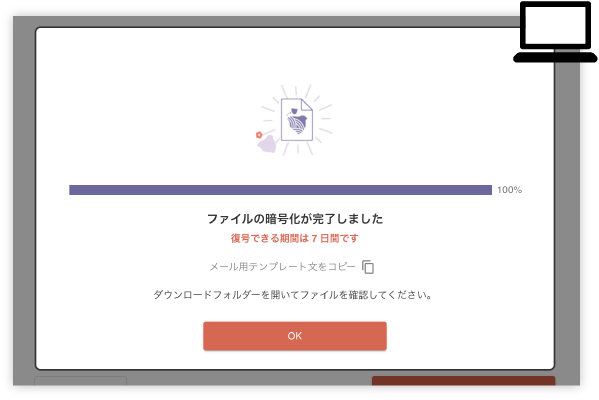
STEP3
Your encrypted file is ready to share.
Cryptan: Four Unique Security Architectures
1. Intelligent Key Management
Dynamic Key Management Based on Usage
Cryptan automatically determines whether a file is intended for personal backup or secure sharing, then applies the optimal key management method.
- Personal Backup: The Data Encryption Key (DEK) is protected with the user’s public key stored in the 4Login app, providing strong device-based protection.
- Secure Sharing: Cryptan automatically switches to a server-assisted key management model, ensuring that only designated recipients or authorized groups can decrypt the file.
2. Zero-Knowledge Security
Private Keys Never Leave Your Device
Your private key is generated and securely stored within the protected area of the 4Login mobile app.
It never leaves your device in plaintext, and even backup data remains encrypted. As a result, even the service provider cannot access or view your encrypted data.
3. Hybrid Cryptographic Architecture
Built for Future Cryptographic Standards
Cryptan completely separates file encryption (AES-256) from key protection.
This layered architecture allows the key protection layer to be upgraded independently to the latest post-quantum standards, such as ML-KEM, without affecting file encryption performance or compatibility.
4. Identity-Based Secure Sharing
From Password Sharing to Identity Verification
Cryptan eliminates the need to exchange passwords.
By integrating public-key cryptography with 4Login authentication, users simply select the designated recipient while Cryptan securely handles the underlying cryptographic processes.
Unlike password-based encryption, encrypted files can only be decrypted when the authorized user’s registered device is present, providing strict identity-based access control.
NEWS
- クリプタンDesktop(ソフトウェア) Ver.2.0.3 リリースのお知らせ
- 【士業実務DX】耐量子暗号に対応したWindows用ファイル暗号化・復号ソフト「クリプタンPQC永続ライセンス(3年利用保証)」販売開始
- クリプタンDesktop(ソフトウェア) Ver.2.0.2 リリースのお知らせ
Try Cryptan Web Try Cryptan Desktop
*Account registration with the “4Login” smartphone application is required to use this service.
*Partial use of some functions requires participation in the “4Login Dev Supporter” program.